最近意外發現我 blog 的文章中,程式碼的 highlight 在 macbook chrome 上顯示異常,除了沒有標色以外,多行的 code block 也變成很長的單行。如下圖: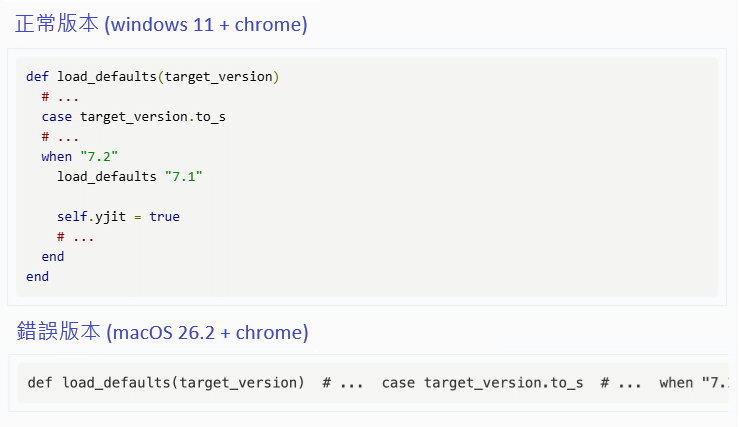
追查問題
一開始我沒有任何頭緒,問了 ChatGPT 只亂給了一些建議,說 “prettyprint” 這個 className 只能加上 <pre> 上,不能加上 <code>。但照著改了後也沒有成功修正問題。
後來觀察到,在 macbook 上,原本的 lang-rb className 被替換為 language-rb。並且在設定斷點測試後,發現 className 是在 PR.prettyPrint() 這行之後,才被替換掉的,也就是原本我用的 prettyprint 有正常運作,只是被其它 script 干擾、改壞了。
因此我們要再來追查是哪一行 js 去改了 DOM 物件上的 className 屬性。由於網頁內載入進來的 js 檔很多,我們很難去下斷點找到是誰改到了 DOM。此時我們可以用 MutationObserver 來監控 DOM 的變化,一有變化就 log 出來,並用 console.trace() 將呼叫者印出來。範例如下:
- 打開檢查元素,設定斷點
- 在斷點中,手動插入
<pre id="monitor" class="lang-rb"></pre>到隨便一個地方 - 在 console 執行 js:
// Manually add <pre id="monitor-root">
const root = document.getElementById('monitor');
const observer = new MutationObserver(mutations => {
  mutations.forEach(mutation => {
    // Attribute changes
    if (mutation.type === 'attributes') {
      console.log('Attribute changed:', mutation.target);
      console.trace();
    }
    // Added or removed nodes
    if (mutation.type === 'childList') {
      mutation.addedNodes.forEach(node => {
        if (node.nodeType === 1) { // Element node
          console.log('Node added:', node);
          console.trace();
        }
      });
      mutation.removedNodes.forEach(node => {
        if (node.nodeType === 1) {
          console.log('Node removed:', node);
          console.trace();
        }
      });
    }
  });
});
observer.observe(root, {
  attributes: true,    // watch attribute changes
  childList: true,     // watch added/removed nodes
  subtree: true        // watch the entire subtree
}); - 讓斷點恢復運行
兇手
最後我們成功印出呼叫者:
原來是 1password 的 chrome extension 會亂 inject prism.js 進來(1Password 討論串),並且 chrome extension inject 進來的 js,預設會在 ignore list 內,在 debugger 工具中被隱藏,所以你再怎麼找也找不到😅。
由於我們沒辦法去 patch 到 chrome extension 的東西,因此就只能等 1password 修正,或是遇到問題時,先暫時停用它。